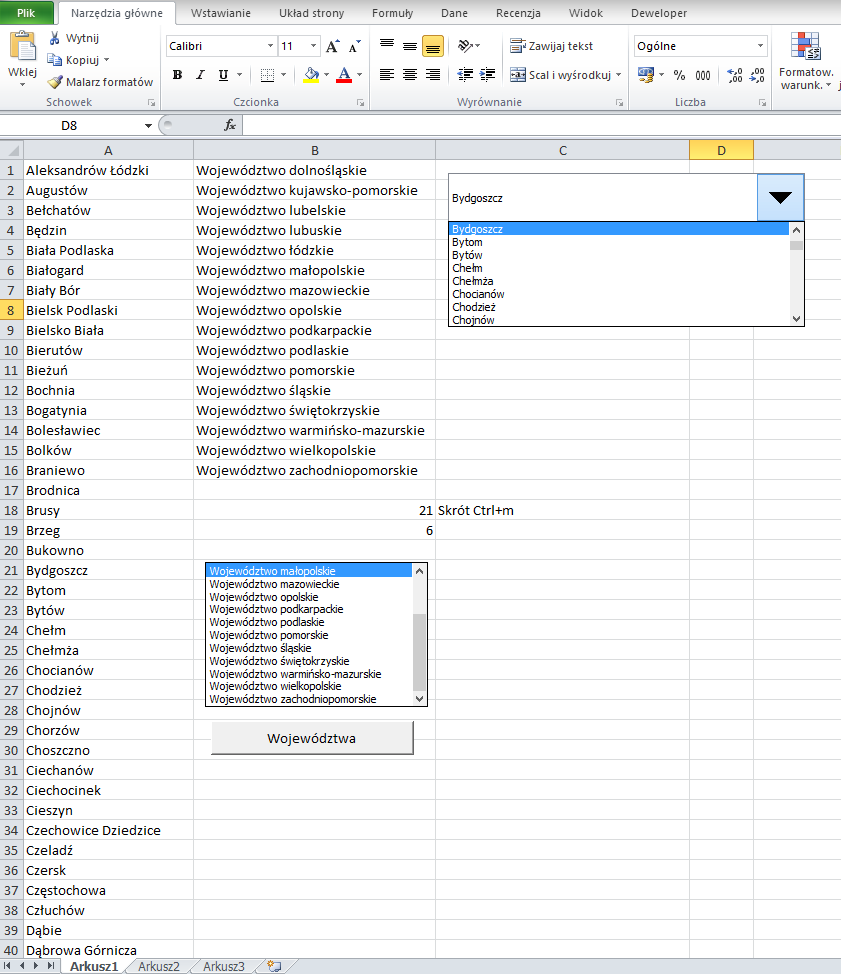
Spinnery i listowanie 11/02/2024 Visual Basic Program: przepisujący zawartość arkusza do spinnera (miasta) oraz listboxa (województwa). Następnie wyświetlający w aktywnej komórce nazwę:aktywnego województwa w przypadku kliknięcia buttona,aktywnego miasta w przypadku wciśnięcia kombinacji klawiszy CTRL+m.Kompilator: Microsoft Excel Galeria: Program w akcji. Kod programu: Sub miasta() ActiveCell.FormulaR1C1 = Cells(Cells(18, 2), 1) End Sub Sub wojewodztwo() ActiveCell.FormulaR1C1 = Cells(Cells(19, 2), 2) Selection.Columns.AutoFit With Selection.Interior .Pattern = xlSolid .PatternColorIndex = xlAutomatic .Color = 255 .TintAndShade = 0 .PatternTintAndShade = 0 End With Selection.Borders(xlDiagonalDown).LineStyle = xlNone Selection.Borders(xlDiagonalUp).LineStyle = xlNone With Selection.Borders(xlEdgeLeft) .LineStyle = xlDouble .ColorIndex = xlAutomatic .TintAndShade = 0 .Weight = xlThick End With With Selection.Borders(xlEdgeTop) .LineStyle = xlDouble .ColorIndex = xlAutomatic .TintAndShade = 0 .Weight = xlThick End With With Selection.Borders(xlEdgeBottom) .LineStyle = xlDouble .ColorIndex = xlAutomatic .TintAndShade = 0 .Weight = xlThick End With With Selection.Borders(xlEdgeRight) .LineStyle = xlDouble .ColorIndex = xlAutomatic .TintAndShade = 0 .Weight = xlThick End With Selection.Borders(xlInsideVertical).LineStyle = xlNone Selection.Borders(xlInsideHorizontal).LineStyle = xlNone With Selection.Font .Color = -1003520 .TintAndShade = 0 End With End Sub Microsoft Excel Program Visual Basic